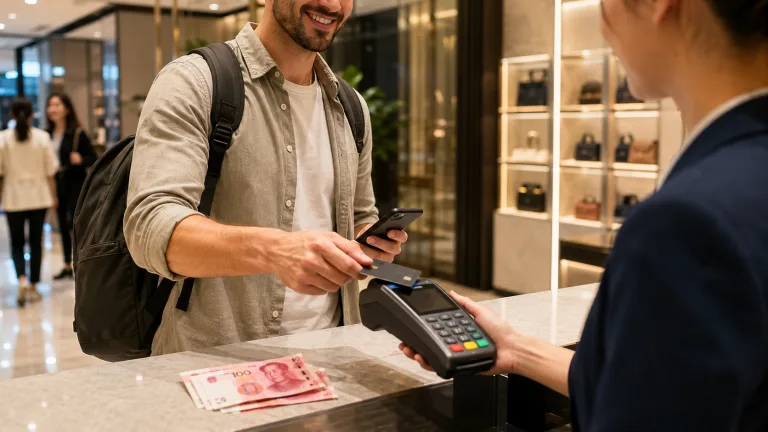

How to Pay in China as a Foreigner: Alipay, WeChat Pay, Cards and Cash (2026)
Paying in China is easier for international visitors than it used to
be, but it still works differently from most countries.

In many restaurants, convenience stores, taxis and small shops, the
normal way to pay is by scanning a QR code with Alipay or WeChat Pay.
Physical Visa and Mastercard terminals are less common outside hotels,
airports, major attractions and large retailers. Cash is legal and
should be accepted, but small businesses may not always have change
ready.
The safest setup for a visitor in 2026 is simple:
- Set up Alipay before your trip.
- Set up WeChat Pay as a second mobile-payment
option. - Link at least one international bank card—and preferably a backup
card from a different issuer. - Carry a modest amount of Chinese yuan for emergencies.
- Keep your physical card available for hotels, major stores and cash
withdrawals.
This guide explains how each method works, what can go wrong and how
to prepare before you arrive.
Quick answer: Foreign visitors can pay in China with
Alipay, WeChat Pay, supported overseas e-wallets, international bank
cards and RMB cash. For everyday travel, Alipay or WeChat Pay linked to
an international card is usually the most convenient option. You do not
normally need a Chinese bank account for ordinary merchant payments.
Quick decision
- Best everyday setup: configure both Alipay and WeChat Pay with eligible international cards.
- Best backup: carry a physical card from another issuer and a modest amount of RMB cash.
- If you only set up one app: start with Alipay, then add WeChat Pay when possible.
The Best Payment Setup
for Most Visitors
| Method | Best use | Main limitation |
|---|---|---|
| Alipay | Everyday payments, transport and in-app travel services | Verification or individual transactions may occasionally fail |
| WeChat Pay | Everyday QR payments and services inside WeChat | Some functions available to local users are not available with an overseas card |
| U.S. PayPal via Weixin Pay network | QR payments for eligible U.S.-based PayPal users | New in 2026 and rolling out by market |
| Physical international card | Hotels, airports, larger stores and attractions | Direct card acceptance is not universal |
| RMB cash | Emergency backup and places where mobile payment fails | Vendors may have limited change |
Do not rely on only one app or one card. A transaction can fail
because of your bank, the payment platform, identity verification, the
merchant’s QR-code type or a temporary risk-control check. Having two
apps plus cash turns most failures into a minor inconvenience.
Cash vs Mobile Payment in China: What Should You Actually Use?
Use mobile payment for convenience, but carry RMB cash as an offline backup. This is not an either-or choice. China’s current official guidance for overseas visitors recognises mobile payments, bank cards and cash, and the 2026 payment-service guide continues to present all three as valid options.
| Situation | Best first choice | Backup |
|---|---|---|
| Convenience stores, restaurants and everyday shopping | Alipay or WeChat Pay | RMB cash |
| Hotels, airports and major retailers | Mobile payment or an accepted international card | Second card or cash |
| Small vendors or personal QR codes | Ask for a merchant QR code | Cash if the overseas-linked card fails |
| Bus fares and small transport purchases | Local transport QR code or ticket machine | Small-denomination cash; exact change may be required |
| Phone, data or app failure | RMB cash | Physical international card where accepted |
How much cash should a visitor carry?
There is no official amount that suits every trip. For ordinary city travel, a modest reserve in smaller notes is more useful than carrying a large sum. Obtain RMB from an authorised exchange counter, bank or compatible ATM, check your card issuer’s withdrawal fees, and avoid relying on a single high-denomination note for a small purchase. Replenish only when needed.
Can a business refuse cash?
RMB cash remains legal tender, and official policy calls for businesses to support cash use. In practice, a small merchant may have little change because most customers pay by phone. If possible, carry smaller notes and state that you need to pay in cash before the transaction is completed. This practical limitation does not make cash obsolete; it is precisely why cash works best as a prepared backup rather than your only method.
Option 1: Use
Alipay With an International Card
Alipay is often the easiest starting point for a first-time visitor.
Foreign users can register with an overseas mobile number, verify their
identity and link eligible international cards without opening a Chinese
bank account.

What you need
- A valid passport
- A mobile number that can receive verification messages
- The latest official Alipay app
- An eligible international credit or debit card
- A stable internet connection
International card support can vary by issuing country and bank. Visa
and Mastercard are widely supported; Alipay has also expanded support
for other global card networks, including American Express. The app will
show whether your specific card can be linked.
How to set up Alipay
- Download the official Alipay app from your phone’s app store.
- Register with your mobile number and enter the verification
code. - Switch the app language if necessary.
- Open the bank-card section and add your international card.
- Enter your name exactly as required by the app and card issuer.
- Complete passport and identity verification if prompted.
- Ask your bank to allow overseas and online transactions.
- Make a small test payment after you arrive in China.
Menus can change as the app is updated, so use the in-app search for
terms such as Bank Cards, Cards or
Payment Settings if the path looks different.
How to pay with Alipay
There are two common methods:
- Scan: Open Alipay, tap Scan, scan
the merchant’s QR code, enter the amount if required and confirm. - Pay code: Open your payment code and let the
cashier scan it.

Always check the merchant name and amount before confirming. If a
small vendor asks you to type the price yourself, verify it verbally or
with a calculator before paying.
Alipay can also provide access to ride-hailing, metro or bus codes,
attraction tickets and other travel services. Availability and identity
requirements vary by city and service.
Option 2:
Use WeChat Pay With an International Card
WeChat Pay—called Weixin Pay in mainland China—is accepted across
much of the same merchant network as Alipay. It is useful as both a
payment method and a backup when Alipay does not work.
How to set up WeChat Pay
- Download the official WeChat app and create an account.
- Open Me, then Services or
Pay and Services. - Enter the wallet or bank-card area.
- Add your international card.
- Complete the requested identity verification using your
passport. - Confirm your mobile number and billing information.
- Enable overseas transactions with your card issuer.
The exact menu labels can vary by app version and account region. If
the wallet is not visible, use WeChat’s search or help function and make
sure the app is up to date.
Important limitations
A foreign-linked card is designed mainly for paying eligible
merchants. It does not necessarily give you all the functions available
to a user with a mainland Chinese bank account. Person-to-person
transfers, wallet balance features, red packets and some mini-program
transactions may be unavailable or restricted.
This matters at very small businesses. A displayed QR code may be a
personal collection code rather than a merchant payment code, and an
overseas card may not work with it. If the payment fails, ask for
another QR code, switch apps or use cash.
New in 2026:
PayPal Access to Weixin Pay QR Codes
Tencent announced in May 2026 that eligible U.S.-based PayPal users
can pay at Weixin Pay merchants in China by scanning QR codes through
the PayPal connection. The rollout starts with U.S. users and is
expected to expand to other markets in phases.
This can be a useful additional option for eligible travelers, but it
should not yet replace a full backup plan. Check your PayPal app before
departure to confirm whether the feature is available for your account
and country.
Tencent also announced a 90-day waiver of its 3% international-card
processing fee for first-time users who link an international bank card
to WeChat. The waiver begins with the first transaction and applies to
eligible daily spending up to RMB 1,000. Promotions can change, so
confirm the terms shown in your app before relying on them.
Alipay or WeChat Pay:
Which Is Better?
For most visitors, the answer is both.
Alipay is often a practical first choice because its international
interface and travel services are easy to find. WeChat Pay is valuable
because WeChat is deeply integrated into daily life and provides a
second route when a merchant payment fails.
| Question | Alipay | WeChat Pay |
|---|---|---|
| Can an overseas visitor link an international card? | Yes, for eligible cards | Yes, for eligible cards |
| Is a Chinese bank account required for normal merchant payments? |
Usually no | Usually no |
| Works for QR-code merchant payments? | Yes | Yes |
| Includes transport and travel services? | Yes, availability varies | Yes, availability varies |
| Full local wallet and transfer functions with a foreign card? | Not always | Not always |
| Recommended role | Primary or co-primary app | Co-primary app and backup |
If you only have time to configure one app, start with Alipay. If you
want a reliable travel setup, configure both.
Fees, Exchange Rates
and Spending Limits
There are three possible costs to watch:
- Payment-platform processing fee. The app should
display any applicable fee before you confirm the transaction. Policies
and promotions can change. - Foreign transaction fee from your bank. Your card
issuer may charge its own percentage or fixed fee. - Currency-conversion cost. The exchange rate may be
set by the card network, issuer or payment arrangement.
Do not assume that “no app fee” means the transaction is completely
free. Check your card’s foreign-transaction policy before traveling.
China increased the general mobile-payment limits for overseas
visitors in 2024 to the equivalent of US$5,000 per single
transaction and US$50,000 annually. Your
actual limit may be lower because of platform rules,
identity-verification status, merchant type or your card issuer’s
controls.
For a normal holiday, those system-level limits are unlikely to be
the main problem. A bank fraud alert or an unsupported merchant code is
more likely to interrupt a payment.
Can You Use
a Foreign Credit Card Directly in China?
Yes, but direct acceptance is inconsistent.
International cards are most likely to work at:
- International and higher-end hotels
- Airports
- Major tourist attractions
- Large shopping centers and department stores
- International chain retailers and restaurants
- Some railway, airline and ticketing channels
They are less reliable at:
- Small independent restaurants
- Street-food stalls
- Local markets
- Small taxis or service providers
- Family-run shops
Look for your card network’s logo at the terminal. UnionPay has the
broadest domestic acceptance, while Visa, Mastercard, American Express,
JCB and other networks depend on the merchant and terminal.
For hotel check-in or deposits, carry the physical card in the same
name as the reservation. A card linked inside Alipay or WeChat may not
replace a physical card when the hotel needs a deposit or
pre-authorization.
Can Foreigners
Still Pay With Cash in China?
Yes. Renminbi cash remains legal tender, and Chinese authorities have
emphasized that businesses should support cash acceptance.
In practice, mobile payments dominate daily transactions. A small
vendor may accept your banknote but have difficulty providing change,
particularly for a large denomination.
Practical cash advice
- Carry a modest emergency reserve rather than funding your entire
trip in cash. - Keep smaller notes for buses, small shops and rural areas.
- Withdraw RMB from an ATM displaying your card network’s logo.
- Check both the ATM fee and your bank’s overseas withdrawal fee.
- Use official bank branches, authorized exchange counters or
recognized exchange machines. - Decline optional dynamic currency conversion when the offered rate
is poor; paying in RMB is often clearer, subject to your card’s
terms.
Do not keep all your cash, cards and phone in the same place.
Do You Need a Chinese Phone
Number?
Not always. Alipay and WeChat can support many overseas mobile
numbers, and foreign visitors can use international cards without
opening a Chinese bank account.
A Chinese SIM or travel eSIM can still make the trip smoother by
improving mobile data access. However, some travel eSIMs provide data
only and cannot receive SMS. Keep access to the number used for your
payment account in case your app or bank sends a verification code.
Before departure, confirm that:
- Your home number can receive roaming SMS.
- Your bank has your correct number.
- You know how to access both payment apps if Face ID or fingerprint
login fails. - You have a data connection that works in China.
What to Do When a Payment
Fails
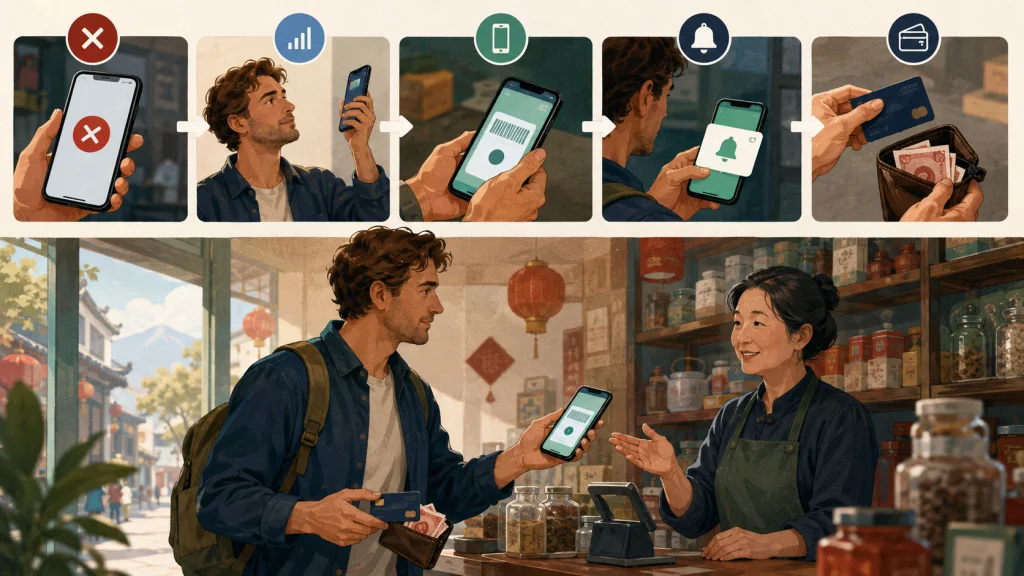
Payment failures are usually fixable. Work through these steps:
- Check that your mobile data or Wi-Fi connection is working.
- Confirm the amount and merchant name.
- Try the other QR method: scan the merchant’s code or let the cashier
scan yours. - Ask whether the merchant has a different business QR code.
- Switch from Alipay to WeChat Pay, or vice versa.
- Try your backup card.
- Check your banking app for a fraud alert or approval request.
- Use RMB cash if necessary.
If the app reports a name or identity mismatch, compare your
passport, cardholder name and app profile carefully. Do not repeatedly
submit different personal details, as that can trigger additional risk
checks.
Payment Checklist Before You
Fly
Complete this checklist several days before departure:
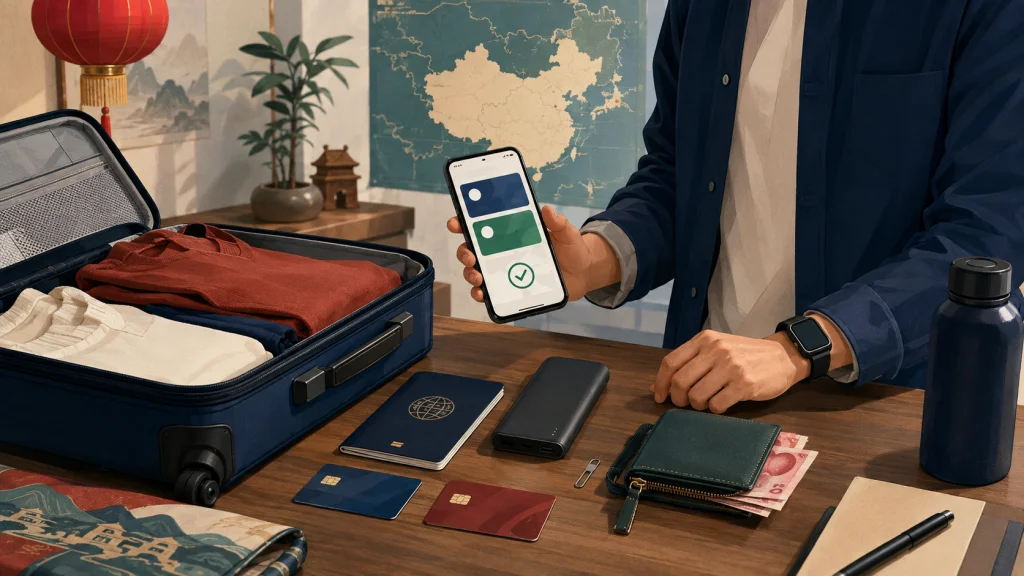
After arrival, make a small purchase before depending on the setup
for a hotel, train or expensive booking.
A Simple Real-World
Payment Strategy
For most visitors, this arrangement works well:
- Small daily purchases: Alipay or WeChat Pay
- If the first app fails: switch to the other
app - Hotels and major retailers: mobile payment or
physical card, depending on the merchant - Transport: use the supported in-app transport code,
ticket machine or cash option for that city - Emergency: RMB cash plus a second physical
card - Eligible U.S. visitors: PayPal can be an additional
QR-payment option where the 2026 connection is available
China is highly mobile-payment-friendly, but “cashless” does not mean
“bring no backup.” The best experience comes from preparing two digital
methods and one offline method.
Frequently Asked Questions
Can foreigners use
Alipay in China in 2026?
Yes. Eligible foreign visitors can register for Alipay, complete
identity verification and link supported international cards for
merchant payments without opening a Chinese bank account.
Can
foreigners use WeChat Pay without a Chinese bank account?
Yes, eligible users can link supported international cards for
ordinary merchant payments. Some wallet, transfer and person-to-person
functions may remain unavailable.
Should I use Alipay
or WeChat Pay in China?
Set up both if possible. Alipay is often a convenient first app for
international visitors, while WeChat Pay provides broad merchant
acceptance and a useful backup.
Can I use Visa or
Mastercard in China?
You can link eligible Visa and Mastercard cards to Alipay or WeChat
Pay. Direct use of a physical international card is more common at
hotels, airports, major attractions and large retailers than at small
local businesses.
Does China still accept cash?
Yes. RMB cash is legal tender and businesses should accept it.
However, some small vendors may have limited change because most
customers pay by phone.
Can I use PayPal in China?
Tencent announced in May 2026 that U.S.-based PayPal users can access
the Weixin Pay merchant QR network, with expansion to more markets
planned in phases. Check your PayPal app to see whether your account is
eligible.
Do Alipay and
WeChat Pay charge foreign-card fees?
Fees and promotions can depend on the platform, transaction and
account. The app should show any platform fee before confirmation, while
your bank may separately charge a foreign-transaction or
currency-conversion fee. Tencent announced a 2026 introductory fee
waiver for eligible first-time international-card users of WeChat.
What is the
best backup if mobile payment fails?
Carry a second payment app, a card from another issuer and a modest
amount of RMB cash. Do not rely on a single phone, app or bank card.
Final Advice
You do not need to arrive in China with a local bank account or a
wallet full of cash. Set up Alipay and WeChat Pay before the trip, link
supported international cards, retain access to your verification number
and carry cash plus a physical card as backups.
Once payment is sorted, the next practical step is learning how to
order confidently at restaurants. Read our guide to ordering
food in China without speaking Chinese.
Reviewed and updated: 1 August 2026. Practical details were checked against the Chinese government’s payment guide for overseas visitors and Tencent’s 2026 inbound-payment announcement. Learn more in the 7ers Editorial Policy.
References
- Chinese government: Guide to Payment Services in China
- Tencent: 2026 inbound-payment measures
- Payment & Clearing Association of China: Guide to Payment Service in China (July 2026)